


The main job Amy Washington, our product ops lead, uses AI for most is comparing product data. Some examples:
A field gets replaced in the PLM and someone needs to know where the new one is still empty.
A brand is about to make its PLM the source of truth and needs to know whether it agrees with NetSuite before the sync is switched on.
Each time this audit has happened before, someone exported the data and built a one-off spreadsheet to find the problems.
We turned that work into a Claude skill so it runs the same way every time on any brand’s exports. Amy showed it in the Make room at OX3 in Stockholm in October.
This one is for the merch or product lead who gets asked whether a range is ready for PO or go-live, and has to answer from systems that don’t agree with each other.
When operators registered for OX3, 42% of them put data accuracy across systems in their top three challenges, more than any other option on the list, so we’re going to assume that’s a lot of you.
Our tracker only counted blanks
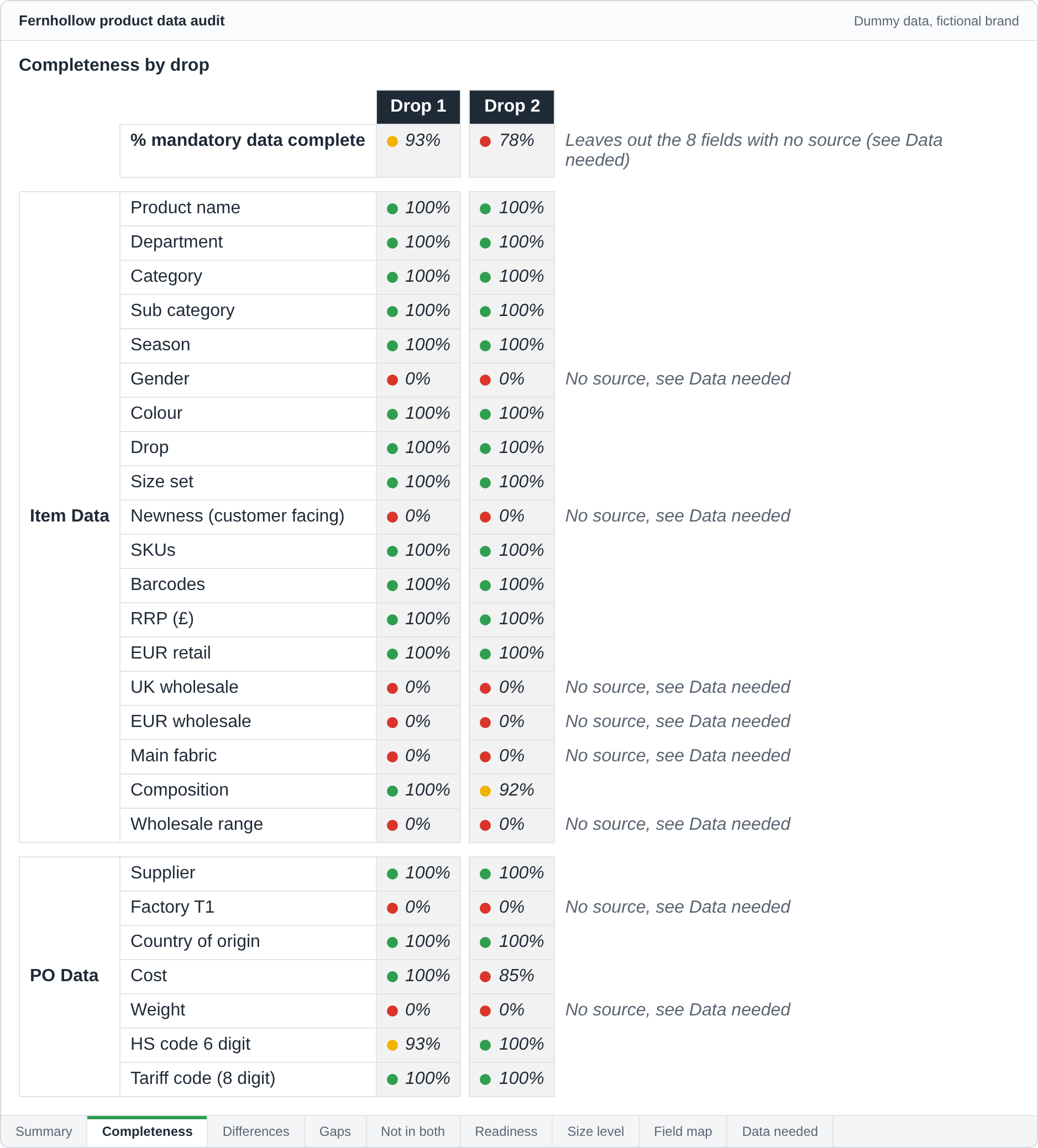
The tracker we’ve used with brands for a while shows completeness by drop. An export gets pasted into the back of a spreadsheet, and a score per field shows where the gaps are. Any field with something in it counts as done, even when the PLM and the ERP hold different values.
“One of the main issues with it is that it only checks for gaps, not inaccuracies. So obviously if there’s something there, it’s like, okay, tick.”
Amy Washington, Commerce Thinking
We made the same point about PLM completeness scores in October. The skill is what we built in response.
Most of the work is matching the systems up
A skill is a saved set of instructions Claude follows when you ask for a particular job. This one takes exports from two or more systems, whether that’s a PLM, NetSuite, a PIM, Shopify or a spreadsheet, and returns one Excel workbook.
Before comparing anything, it works out which system each file came from and which key links products across them. It tests candidates like article number and SKU to see which matches the most records, and reports the match rate both ways.
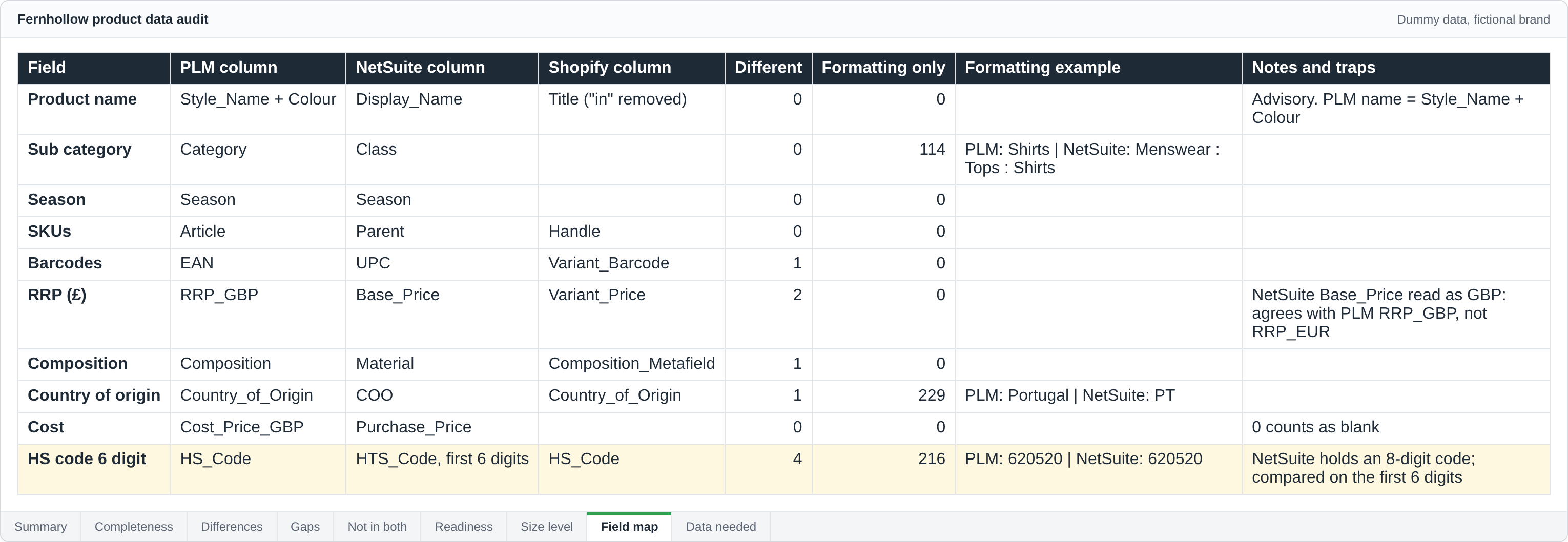
Then it builds a field map showing which column in each system holds the same information.
Colour might be Colour in one system and Colorway in another.
A PLM column called Weight can hold fabric weight, like “Mid Weight”, while the ERP’s Weight is in kilograms.
The skill checks each pairing against real values before trusting it, and in a live session it shows you the map to confirm before running the full comparison.
Formatting differences get counted and left out of the list
A lot of what looks like disagreement is the same information written two ways, such as a country code against a country name, or fibres listed in a different order. The skill counts these separately and keeps them off the list you have to work through.
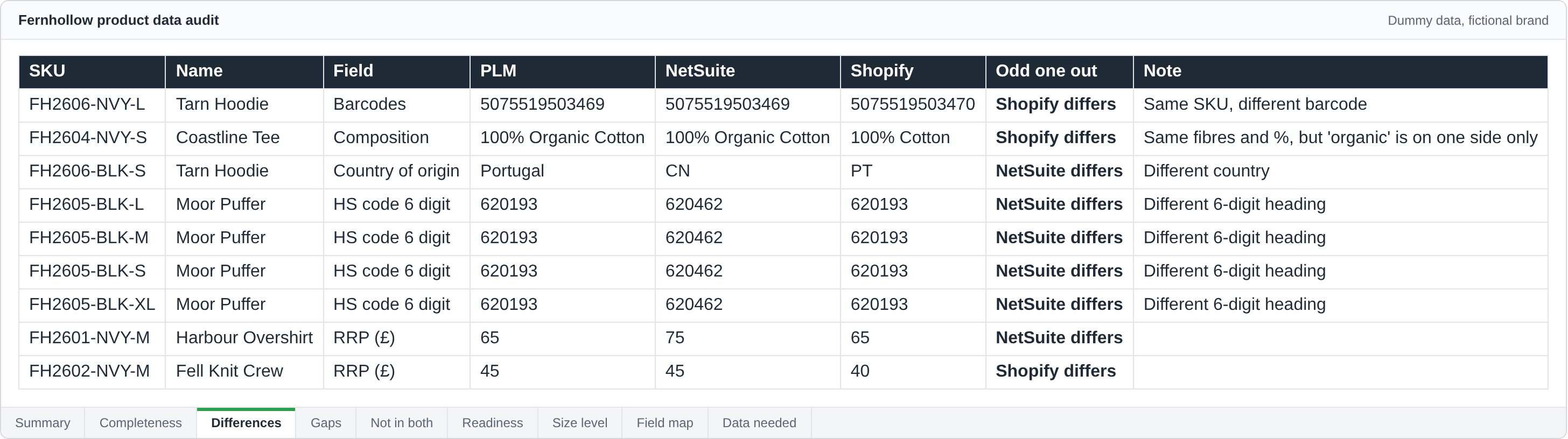
What’s left are real differences, with a short note where the reason is clear. Two tariff codes might share the same six-digit heading and differ after it.
In the Fernhollow sample, Shopify listed a navy tee as 100% Cotton where the PLM and NetSuite both said 100% Organic Cotton, and the skill noted that the fibres and percentages match but “organic” is on one side only.
With more than two systems, it names the odd one out, so you know which system to fix. At one brand we work with, Shopify disagreed with both the PLM and NetSuite on the HS code for around 4,000 articles, while those two agreed with each other.
With more than two systems, it names the odd one out, so you know which system to fix. At the same brand, Shopify disagreed with both the PLM and NetSuite on the HS code for around 3,900 articles, while those two agreed with each other.
It never picks a winner
When two systems disagree, the skill flags it and stops there. It doesn’t change the source files and doesn’t guess which value is correct. That call belongs to someone who knows the product, and it usually means someone going off to check.
Amy sent one of her early comparisons to a product merchandiser at a brand we work with. She would rather see how a result was worked up than be handed an answer, so she took the sheet away and checked it herself. The workbook is laid out for someone who works that way.
Amber is the product your tracker called done
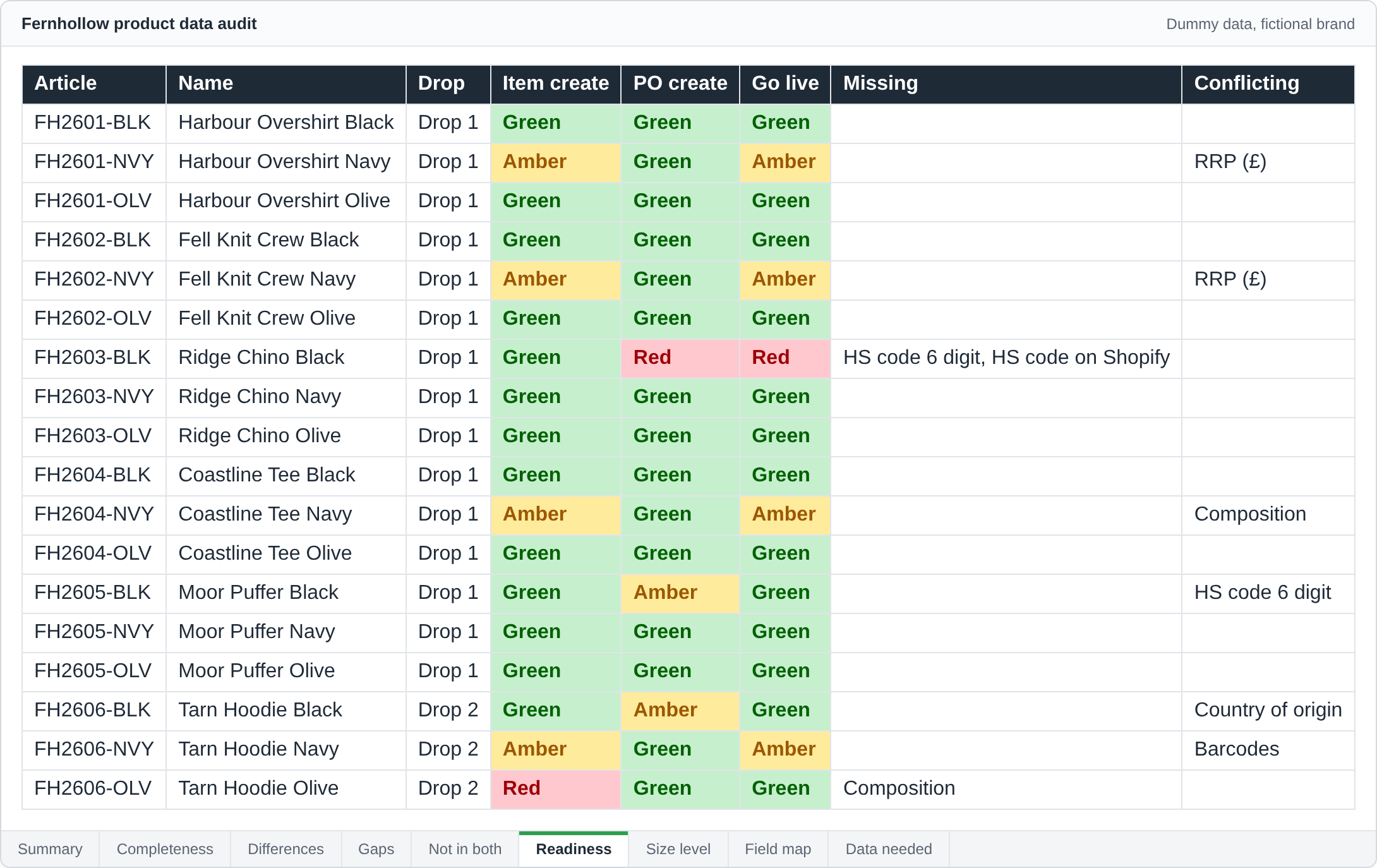
The Readiness tab gives every product a colour for each stage, from item create through PO create to go live.
Red means a required field is empty. A green product has every field filled and no system disagreeing. Amber sits between the two, with everything filled in but at least one field holding different values in different systems, which a blanks-only tracker would have marked complete.
“Getting a product ready for PO and getting a product live. What data is needed in order to do that? Do we have it and is it accurate across systems?”
Amy Washington, Commerce Thinking
One workbook, with the same tabs every time
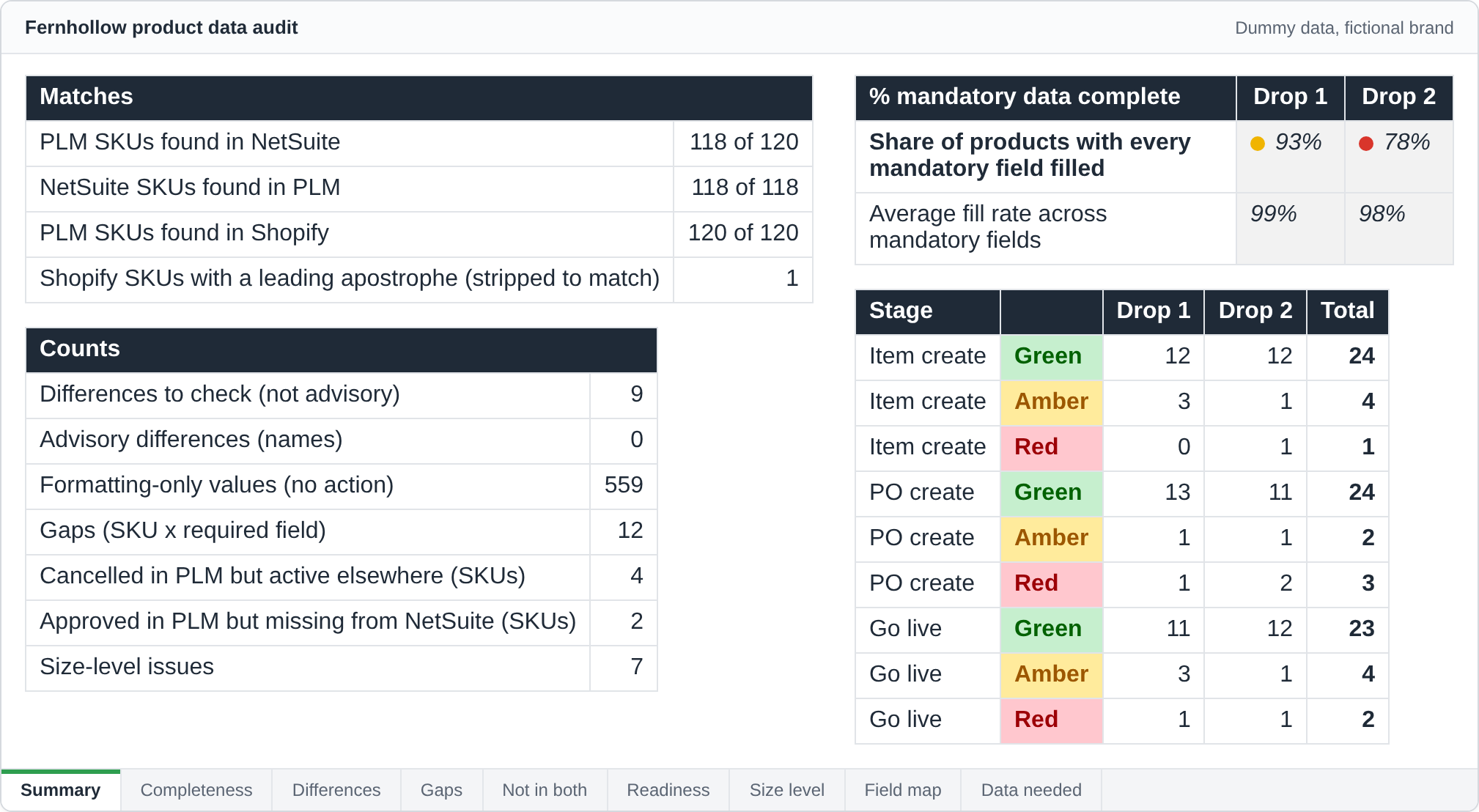
A summary of what was compared, the match rates and the biggest issues
Completeness by drop, with traffic lights
Every difference between systems, product by product
Gaps, where a required field is empty
Products found in one system only, labelled with the likely reason, such as cancelled in one and still active in the other
Readiness per product for each stage
Size-level issues, including barcodes that differ for the same SKU
The field map
A list of what else it would need for a complete picture
The traffic lights go green at 100%, amber from 90% and red below that. Percentages round down, so 99.6% shows as 99% and never passes as complete. If your own tracker uses different thresholds, it uses yours.
At the brand above, the one-system-only check found 26 articles cancelled in the PLM and still live on Shopify.
We tested it on a brand that doesn’t exist
Before OX3 we built a fictional brand, Fernhollow, with PLM, NetSuite and Shopify exports covering 120 SKUs across 30 colourways. We planted 13 problems in the data and wrote them up in an answer key. Run on those files, the skill found all 13 and flagged nothing we hadn’t planted.
Email me at lauren@commercethinking.com and I’ll send you the skill and the Fernhollow sample files. Run it on the sample first and check the result against the answer key, then try it on your own exports.
If you’re building something similar
Start from the tracker your team already uses. Our completeness tab copies the layout operators already know
Give it your own required fields for each stage, or it falls back to a default list
Read every code as text, or leading zeros disappear
Strip the apostrophe Excel adds to some Shopify SKUs, or they won’t match
Shopify exports put product fields on the first variant row only, so fill them down before comparing
Treat a zero price or weight as blank
Test it on made-up data with an answer key before you trust it on real data
If you’re the person who has to say whether a range is ready, check whether your current process would catch two systems that both hold a value and disagree. If it only counts blanks, that’s the gap worth closing first.